About Xaero's Minimap
Xaero's Minimap, by xaero96, draws a live map of the terrain around you in a corner of the screen, marks nearby players, mobs and items on it, and adds waypoints that show on the map and as markers in the world itself. It deliberately keeps the look of vanilla Minecraft, and its author credits it as the first rotating square minimap made for the game. It runs on your own client, so it works in singleplayer and on servers that know nothing about it. Installing it on a server as well is optional and adds a few things covered below.
What the corner map shows
The map is square by default and can be switched to a circle. It rotates with you unless you lock north, in which case an arrow shows your heading instead. Size, zoom (I and O by default) and position are all adjustable, down to a single pixel on the Change Position screen, which helps when another mod's interface wants the same corner. Pressing Z enlarges the map for a closer look. Every key binding lives in the vanilla Controls menu, and Y opens the mod's own settings.
Two colour modes decide how the terrain looks. Vanilla reuses the colours of paper maps, and Accurate samples the block textures and biome tints, which also reflects your resource pack. Underground, or under a solid roof, the map switches to cave mode by itself. The size of the roof it looks for is a setting, and 3x3 or larger stops a single log overhead from flipping the map while you chop a tree.
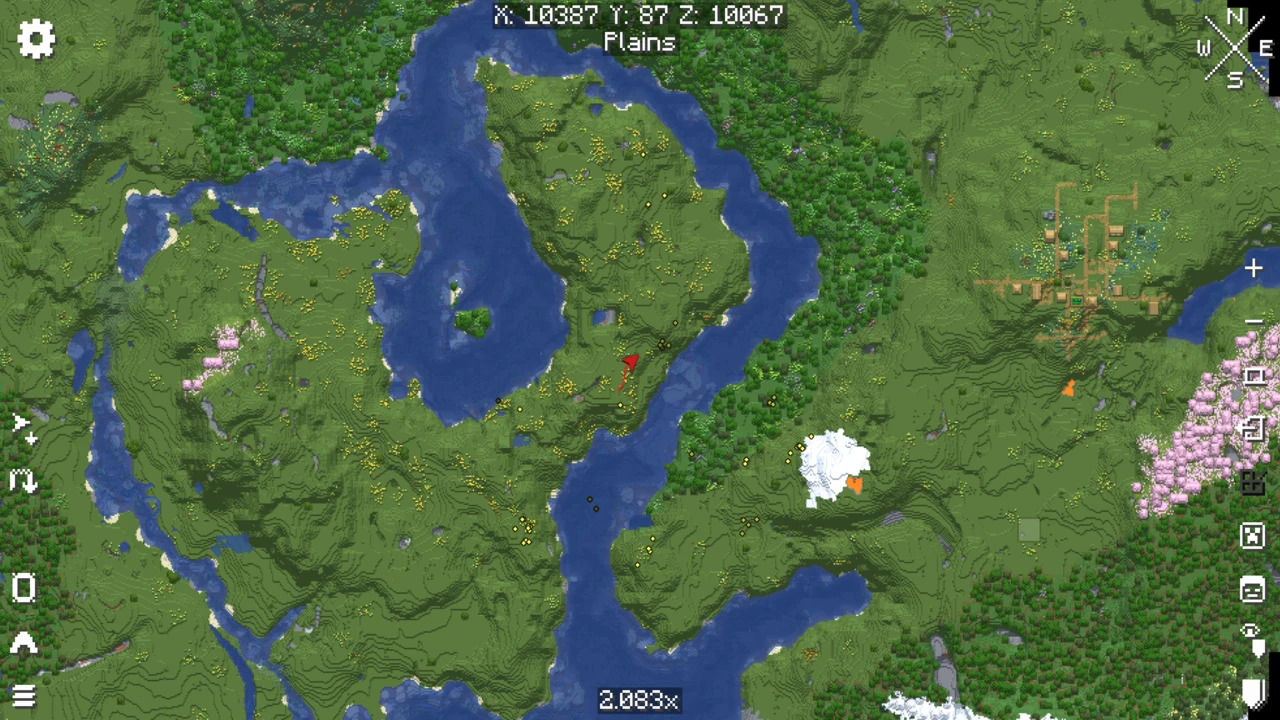
The entity radar marks players as white dots, mobs as yellow (with hostile and friendly mobs colourable separately), items as red and everything else, arrows and item frames included, as purple. Any category can show heads or icons instead of dots, or be hidden. Optional overlays add a chunk grid, slime chunks and a light overlay that by default marks blocks with block light 0 to 7, the spots where hostile mobs can spawn. Coordinates, biome, light level and game time can sit under the map.
Mob icons are drawn from each entity's own model, which covers every vanilla mob and some simple modded ones with an obvious head. When the mod cannot find a recognisable head on a modded mob, it falls back to a coloured dot. Since version 21.6.0 a resource pack can supply its own icons under assets/xaerominimap/entity/icon/, and at least one community pack does this for popular mods. Claims and allied players from the Open Parties and Claims mod also show on the map.
Waypoints
B creates a waypoint and U opens the full list, where waypoints can be edited in bulk, sorted, hidden and viewed from other dimensions. Every death leaves a skull-shaped deathpoint automatically. Waypoints come in two kinds. Global ones stay visible at any distance, while local ones obey the Max WP Draw Distance setting, so one global marker can label a region while local markers inside it stay out of sight until you arrive. Sets group waypoints further, and a key binding switches the active set.
Sharing works through the game chat: send a waypoint from the list and other players with the mod can add it. Teleporting to a waypoint sends a chat command, /tp @s x y z by default, so it needs permission to run that command, which in vanilla means operator status or cheats. Servers with their own teleport plugin can set a different command in the waypoint options, usually without the @s.
Full edition or fair-play
The mod comes in two editions. The full edition, the one in this page's download table, has no restrictions. The separate fair-play edition shows no entities and no cave maps, which keeps things even on PvP servers where other players have no minimap. Servers can also enforce those limits on players running the full edition.
What a server installation adds
A Fabric, Quilt, NeoForge or Forge server can run the minimap too. The first benefit is world identification: each world on the server gets its own waypoint "sub-world" reliably. Without the server copy, the mod separates worlds by their spawn point, which is much less reliable, and on a single-world server the author recommends switching multiworld detection off in the waypoint options.
From version 25.3.0, admins get a Minimap Server Settings key binding that opens a screen for enforcing nearly any option, cave mode and the entity radar included, even with custom radar categories. Rules can follow ranks through the xaero.minimap.enforced_server_profile permission, with FTB Ranks, Odyssey Roles and LuckPerms supported. Map makers can use potion effects such as xaerominimap:no_minimap, no_entity_radar, no_waypoints and no_cave_maps, and a config line such as minimapItemId:minecraft:compass hides the map until the player carries that item.
One side effect catches server owners out. With the mod on the server, players without it cannot join, because of the status effects it registers. The server's common config in config/xaero/minimap has an option to stop registering them. Change it, restart, and do the same for Xaero's World Map if it is installed.
When waypoints seem to vanish
Missing waypoints are almost never deleted. Waypoints are stored per server address and per sub-world, so a changed address or the wrong sub-world marked as automatic hides them. Open the list with U and check the sub-worlds in the top-right dropdown. If the address changed, find the old one in the top-left dropdown and use Options, then Make World/Server Auto. With the World Map installed, the map you confirm on its screen also decides which waypoint sub-world is automatic, so confirming the wrong map is a common cause.
Reading the file names
Files released since January 2026 are named like xaerominimap-fabric-26.3-26.5.3.jar: loader, Minecraft version, then the mod's own version. Since June 2026 that mod version has started with 26, so it reads like a Minecraft release without being one. Only the middle number tells you which game version the file is for.
Pairing it with Xaero's World Map
Xaero's World Map is the fullscreen companion. With both installed, the minimap reuses the world map's rendered chunks instead of generating its own, which the author notes improves performance, and the world map displays and edits the minimap's waypoints. Keep both current: the latest minimap refuses World Map versions older than 1.44.0. The author also warns against XaeroPlus, a third-party add-on that is not affiliated with the Xaero mods and, according to the author, causes crashes that are hard to trace.
Every loader and Minecraft version has its own minimap file, and the Fabric one needs Fabric API next to it.
How to Download Xaero's Minimap for Minecraft
Start from the Xaero's Minimap Downloads section. Choose your Minecraft version, then your loader, and the table leaves the one file you need. Its Download button takes you to that file on Modrinth. Quilt uses the Fabric row. The table lists the full edition. The fair-play edition is a separate project on the author's pages.
How to Install Xaero's Minimap in Minecraft
- Get Fabric, NeoForge or Forge running for your Minecraft version first.
- Put the minimap jar in the
mods folder. On Fabric, add Fabric API for the same Minecraft version. On Forge 1.12.2 or 1.16.5, add XaeroLib for that version instead. Newer files have XaeroLib built into the jar.
- If you use Xaero's World Map as well, update it at the same time. Current minimap files refuse World Map versions older than 1.44.0.
- When updating, delete the previous minimap jar first. Two copies of the same mod in one folder stop the game from starting. Some modpacks already include the minimap, Better MC among them, so look through the pack's mods before installing your own copy.
- Launch and join a world. The map appears in the corner straight away.
On a server
Installing the same file on a Fabric, NeoForge or Forge server is optional. It gives each world its own waypoints and unlocks the server settings screen for admins. Before inviting players who do not use the mod, turn off the status effect registration option in the server's common config under config/xaero/minimap, then restart, or they will not be able to join.
Checking that it works
Press Y in game to open the minimap settings, and B to create a test waypoint. If the keys do nothing, look for them under Controls, where the mod's bindings live. A crash at launch usually means a missing Fabric API, a jar for another loader, or a minimap and World Map from different generations. For general loader problems, see the mod installation guide.
Waypoints are saved in the game directory under xaero/minimap (XaeroWaypoints in older versions). Copy that folder along when you move to a new instance or launcher, and your waypoints come with you.