About Jade
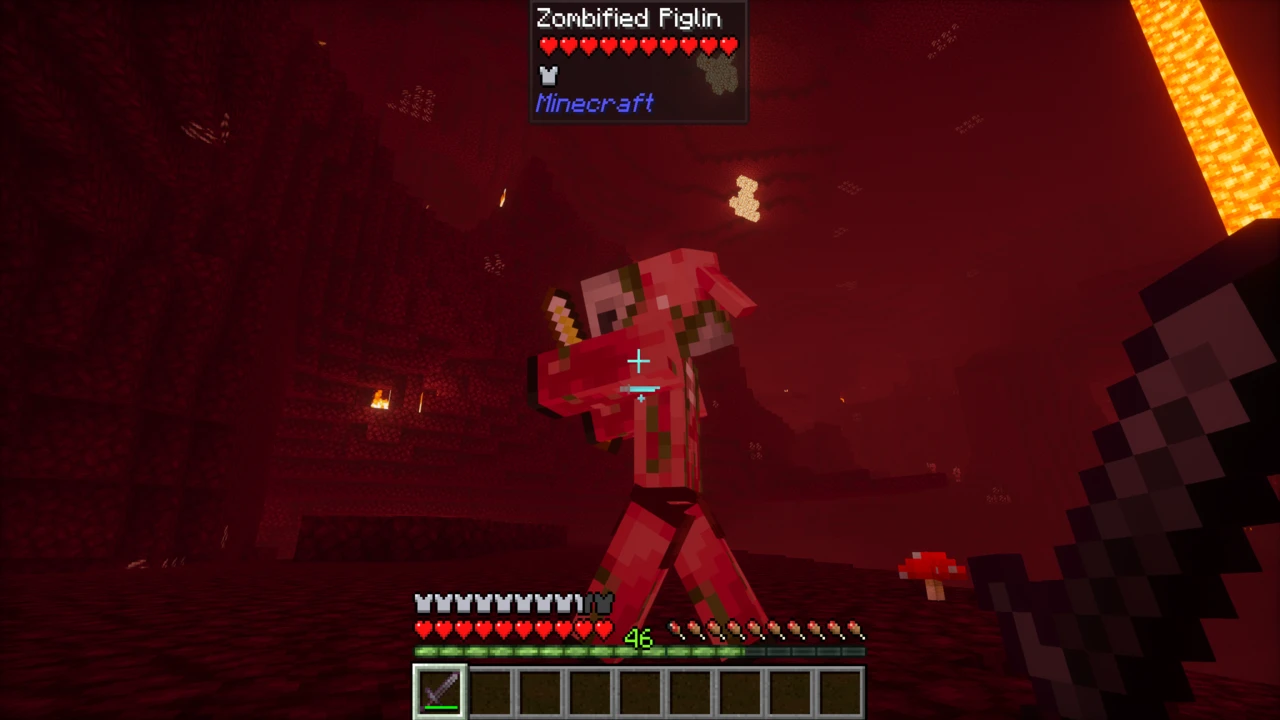
Point your crosshair at anything in Minecraft and Jade puts a small panel at the top of the screen telling you what it is. A block, a mob, a fluid, a machine from some mod you installed three modpacks ago. Jade names it, tells you which mod it came from, and adds whatever is worth knowing about it right now: how full the furnace is, how much health the creeper has left, whether the wheat is ready.
It is the kind of mod you stop noticing after a week and then badly miss when it is gone. Jade is maintained by Snownee and is a fork of HWYLA by TehNut, which was itself a fork of WAILA, the same lineage of "what am I looking at" mods going back years, carried forward to current Minecraft versions.
What the panel actually tells you
The contents change with whatever you are aiming at. In vanilla Minecraft, some of the more useful cases:
- Any block or entity: its name, plus the mod it belongs to. Vanilla blocks are labelled as Minecraft, so an unfamiliar block instantly stops being a mystery.
- Mobs: a health bar with the numeric value, active status effects, and extras that depend on the mob: a horse's speed and jump, a villager's profession, how far along a zombie villager's cure is, a tamed pet's owner.
- Crops: growth stage, so you can tell at a glance whether a field is worth harvesting.
- Furnaces and brewing stands: progress and fuel, without opening the interface and interrupting what you were doing.
- Containers: a preview of what is inside a chest, barrel or shulker box.
- Odd corners of vanilla: note block pitch, redstone signal strength, what a jukebox is playing, which mob a spawner is set to, how many bees are home.
Modded blocks depend on the mod. Many mods ship their own Jade support, which means their machines show energy, fluid levels and progress with no extra setup. Mods that do not may be covered by Jade Addons instead: a separate download, covered further down. Neither is guaranteed for any given mod, so a modded block showing only its name is normal rather than a fault.
The client and server split, in plain terms
This trips people up more than anything else about Jade, and the short answer is that both halves are optional but they do different jobs.
Jade draws the panel on your machine, so installing it on the client alone is enough to use it. Names, mod sources, health bars, status effects, crop growth, fluids and most block states are all read from information your game already has.
What the client cannot see is data the server never sent it. The contents of a chest you have not opened, the fuel level in a brewing stand, the number of bees in a hive. That state lives on the server, and it takes a server-side Jade to hand it over. On a single-player world this is invisible, because your game is quietly running both sides at once. On a multiplayer server it is very visible: Jade works, but the container previews are simply absent.
- Playing single-player? Install Jade and you have everything.
- Running a server? Add Jade server-side if you want players to get the full panel. It does not force anything on anyone: players without Jade see no difference, and players with it get more.
- Joining someone else's server? Install it client-side and it will work. If containers stay blank, the server has not installed Jade, and that is the server's call rather than something you can fix locally.
There is no failure mode here worth worrying about. A missing server-side install costs you a few features. It does not throw errors and it does not stop you connecting.
Reading Jade's version numbers
Jade's version numbers are not a single line that counts upwards. Each Minecraft version gets its own branch, and the branch is named after the Minecraft version it targets. As of August 2026 the current builds are 26.2.11 for Fabric and 26.2.9 for NeoForge, both for Minecraft 26.2, both released on 15 August 2026.
So "Jade 26.2.11" means "the eleventh Jade build for Minecraft 26.2", not "Jade, eleven versions after 26.2.0 of the mod". Older branches carry their own numbering entirely: builds for Minecraft 1.21.11 sit in the 21.x range. The practical consequence is that there is no single latest Jade to go looking for. There is a latest build for your Minecraft version, and that is the one you want.
Loaders: Fabric and NeoForge on current versions
Jade is published for Fabric, NeoForge, Quilt and Forge, which is what the Loaders row on this page lists. Not all four exist on every Minecraft version, though, and that is the thing to check before you go hunting for a file that was never built.
- Fabric: available across the full supported range, including Minecraft 26.2. The Fabric file is also tagged for Quilt, so Quilt users install the Fabric build.
- NeoForge: available on 1.20.2 and newer, including 26.2.
- Forge: legacy only. The newest Minecraft version with a Forge build is 1.20.4. If you are on a modern version and running Forge, there is no Jade for you. NeoForge is where that path continued.
Builds are not interchangeable between loaders, and they are not interchangeable between Minecraft versions either. Both have to match.
Does Jade need anything else installed?
This differs by loader, and most write-ups get it wrong, so it is worth stating exactly:
- Fabric builds require Fabric API. The current 26.2 Fabric release lists it as a required dependency. Without it the game will not start.
- NeoForge builds require nothing. The current 26.2 NeoForge release has no required dependencies at all.
- JEI is optional on both. It unlocks two keybinds and nothing else (see below).
Keybinds, and what to do if you have no number pad
Jade's controls default to the number pad:
- Numpad 0: open Jade's configuration screen
- Numpad 1: turn the overlay off and on
- Numpad 2: toggle fluid display
- Numpad 3: show recipes for the thing you are looking at (needs JEI)
- Numpad 4: show uses for the thing you are looking at (needs JEI)
- Numpad 5: narrate the target aloud
On a laptop keyboard with no number pad, none of these do anything by default, which is a common reason people think Jade has broken. They are ordinary Minecraft keybinds and can be reassigned under Options → Controls → Key Binds like any other. Numpad 1 is the one worth rebinding first, because an accidentally toggled overlay looks identical to a mod that failed to load.
The configuration screen itself is reachable from the Mods menu as well, so you are not locked out of it by a missing key. Jade is unusually configurable once you get there: individual information providers can be switched off, blocks can be added to an ignore list, the panel can be moved and re-anchored, and there is a narration option for accessibility.
Jade Addons is a different mod
Jade Addons is a separate optional download from the same developer that adds integrations for specific mods: Create, Lootr, Supplementaries, Artifacts, Tinkers' Construct, EnderIO and Modern Industrialization among them. It is not part of Jade, it is not required, and Jade is fully functional without it.
Three things to know before you go looking for it. It ships as two separate projects, one for Fabric and Quilt and one for Forge and NeoForge, and you need the one matching your loader. Its latest supported Minecraft version is 1.21.1, so there is currently no Jade Addons for the 26.x branch. And it is released under All Rights Reserved rather than Jade's Creative Commons licence. The two projects are licensed differently, which matters if you are assembling a modpack.
Jade compared with the alternatives
Jade is one of three mods doing broadly the same job. The One Probe takes a different visual approach and can require a probe item in hand for a more survival-flavoured feel. WTHIT is another fork of the same HWYLA ancestry. They overlap almost completely in purpose, so modpacks generally pick one. Running two just puts two panels on your screen showing the same thing. Utility mods that do not overlap with it at all are a different matter: Litematica for building from a schematic and VeinMiner for clearing an ore vein in one swing both sit happily beside Jade.
If you are arriving from WAILA or HWYLA, Jade is the branch of that family still being updated. Be aware that Jade rebuilt the plugin API rather than inheriting it, so add-ons written for HWYLA should not be assumed to work.
Java Edition only
Jade is a Minecraft: Java Edition mod. There is no Bedrock version, and there cannot be a direct port: Bedrock uses add-ons rather than Java mod loaders, and the two systems are not compatible. That also rules out consoles and the Pocket Edition apps, which all run Bedrock. Any site offering "Jade for Bedrock" is not distributing anything from Snownee.
How to Download Jade for Minecraft
Almost every failed Jade install comes down to downloading the wrong file, and there are three things to match rather than one. Work them out before you open a download page.
- Your exact Minecraft version. Jade branches per Minecraft version, so a build for 1.21.11 will not run on 26.2. Filenames spell this out: the current Fabric release is
Jade-mc26.2-Fabric-26.2.11.jar, with the Minecraft version sitting right after mc.
- Your loader. Fabric and NeoForge builds are separate files and cannot be swapped. On Quilt, take the Fabric build, which is published for both.
- Whether a build exists at all. On Forge specifically, Jade stops at Minecraft 1.20.4. If you are on Forge on a newer version, no amount of searching will turn one up.
With those three settled, open the Jade Downloads section on this page, filter it to your Minecraft version and loader, and click Download on the matching row. That takes you to the official Modrinth file for it. CurseForge is official too. The author is Snownee, so a page crediting anyone else is the wrong place.
How to Install Jade in Minecraft
Fabric: install Fabric API too
This is the step people skip. The current Fabric build of Jade lists Fabric API as a required dependency, so Jade alone will not start the game.
- Install Fabric Loader for your Minecraft version and run the launcher once so the Fabric profile exists.
- Download two files: Jade's Fabric build for your Minecraft version, and Fabric API for the same Minecraft version.
- Put both
.jar files into your mods folder: %appdata%\.minecraft\mods on Windows, ~/Library/Application Support/minecraft/mods on macOS, ~/.minecraft/mods on Linux.
- Launch through the Fabric profile.
NeoForge: Jade on its own is enough
The NeoForge build has no required dependencies, so this is a single-file install.
- Install NeoForge for your Minecraft version and let it create its launcher profile.
- Download the NeoForge build of Jade for that Minecraft version.
- Drop the
.jar into your mods folder.
- Launch through the NeoForge profile.
Adding Jade to a server
Server-side Jade is what makes chest previews, brewing stand fuel and beehive counts appear for players. It is worth adding, and it asks nothing of the people connecting.
- Put the build matching the server's Minecraft version and loader into the server's
mods folder. On Fabric servers, Fabric API goes in alongside it.
- Restart the server.
- Keep the server and client on the same Jade branch. Matching Minecraft versions already forces most of this, but a large gap between builds is worth closing.
Players who have not installed Jade are unaffected: they see the server exactly as before. Players who have installed it get the full panel instead of the reduced one.
Optional extras, and when they are worth it
- JEI: install it if you want Numpad 3 and Numpad 4 to pull up recipes and uses for whatever you are looking at. Everything else in Jade works without it, and the keys simply do nothing if it is absent.
- Jade Addons: only worth adding if you are running one of the mods it supports, such as Create. Match the Fabric or Neo/Forge edition to your loader, and note that it currently stops at Minecraft 1.21.1.
Confirming it loaded
Look at a block. If a panel appears at the top of the screen naming it, Jade is running. If nothing appears, work down this list before reinstalling anything:
- Press Numpad 1. The overlay toggle is the single most common cause, and on a laptop with no number pad you may not be able to press it. Rebind it under Options → Controls → Key Binds.
- Check the Mods list on the title screen. If Jade is not listed, the file never loaded, which points at a version or loader mismatch rather than a setting.
- On Fabric, check Fabric API is present. A missing required dependency usually stops the game before it reaches the menu.
- Confirm you launched the modded profile. A vanilla profile loads no mods and gives no warning that it has not.
If the panel appears but chests and brewing stands show nothing on a multiplayer server, nothing is broken: that is the server-side half of Jade missing, and it needs the server admin rather than a reinstall.
If Jade never reaches the mod list at all, our guide to mods that will not load covers version and dependency mismatches in more depth.