About Just Enough Items (JEI)
Just Enough Items (JEI) is a recipe and item viewer by mezz. It lists every item in the game, vanilla and modded, in a panel beside your inventory, and with one key shows how to make any of them or what they are used for. Even in plain vanilla it answers questions the recipe book cannot, such as what a brewing ingredient is for.
R for recipes, U for uses
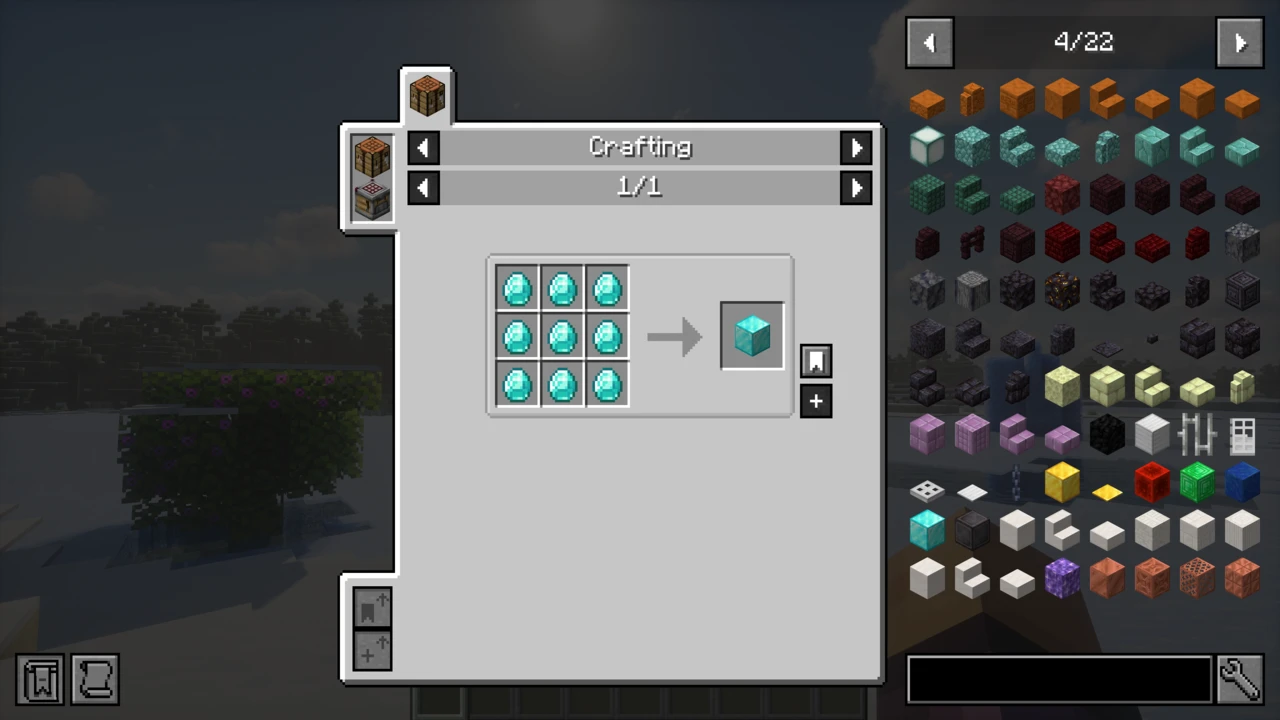
Almost everything in JEI starts from two keys. Hover over any item, in your inventory or in JEI's list, and press R to see the recipes that produce it, or U to see the recipes that consume it. In the item list itself, a left click shows recipes and a right click shows uses. Backspace steps back to the previous recipe you looked at, and Ctrl+O hides or shows the whole overlay.
The recipe screen groups results into categories along the top: crafting, smelting, brewing, and every machine a mod adds through its JEI plugin, so a single item can be traced through a furnace, a crusher and a crafting table. Clicking a category's name lists every recipe in it. When a crafting table or a supported machine is open, the [+] button beside a recipe moves the ingredients from your inventory into the grid, highlighting what you are missing. Shift-click it to move enough for several crafts.
Whether a modded machine shows up at all depends on that mod shipping a JEI plugin. A category missing for one mod is something to raise with that mod's author, not a fault in JEI.
Searching the item list
Click the search bar, or press Ctrl+F, and type. Plain words match item names, and tooltip text as well by default. A prefix limits a word to one property, and current JEI lists each prefix in the Search section of its settings:
@ for the mod that adds an item, as in @create# for item tags, such as logs or ingots$ for words anywhere in the tooltip% for the creative inventory tab^ for an item's main colour& for the item ID, such as minecraft:stone
Only the first three work out of the box. Creative tab, colour and ID search ship switched off, so ^red finds nothing until Search Color Names is turned on in those settings, and the other two work the same way. A minus sign excludes a term, quotation marks keep a phrase together, and a vertical bar combines alternatives, so wrench|hammer finds either. Search suggestions appear as you type. The control list on JEI's project page predates this layout and uses # for tooltips and $ for the old Ore Dictionary, and older JEI releases follow that scheme. If a prefix seems to do nothing, the Search settings show whether that mode is on and which character your version expects.
Bookmarks and lookup history
Pressing A over an item pins it to a bookmark list on the left of the screen, and pressing it again removes the bookmark. Whole recipes can be bookmarked from the recipe screen too. With a crafting grid open, Shift-clicking a bookmarked recipe crafts one and Ctrl-clicking crafts many, straight from the list. The Previous Recipe key (Backspace) and the Next Recipe key (unbound until you set one) step backwards and forwards through what you looked up, like a browser's back and forward buttons.
Smaller things in current JEI
Recent JEI builds, the 26.x line especially, have added conveniences that older guides do not mention:
- Lookup history, a strip of the ingredients you recently looked up, separate from the back and forward keys.
- Craftable recipes first, a toggle on the recipe screen that sorts recipes you can make right now to the top.
- Ingredient cycling. Slots that accept any plank or any wool rotate through the options. A Pause Recipe Ingredient Cycling key freezes them while you read, and cycling can be switched off entirely.
- Tag and information pages. Tag categories list every item in a tag, and some items carry an Information page describing how to obtain them.
- Resizable panels. The recipe screen, item list, bookmarks and history can be resized by dragging their edges, and the Max Overlay Width setting limits how wide the side lists grow.
Cheat mode and hiding items
Cheat mode turns the item list into a creative-style spawner. In current JEI it has no key by default: Ctrl-click the JEI config button to switch it on, or bind Toggle Cheat Mode in Controls. Then a click gives one item, and Shift-click or a middle click gives a full stack. The control list on the project page describes the older behaviour, where a plain click gave the stack. The Hide Ingredients mode works the other way. Turn it on in JEI's settings or with its key (also unbound by default), then Ctrl-click an entry to hide it, or Ctrl-right-click to hide it together with all its variants. Pack makers use it to clear out technical items players should never see. Everything hidden this way is written to the Ingredient Blacklist in JEI's configuration, where it can also be edited by hand.
Singleplayer, servers and Minecraft 1.21.2
On Minecraft 1.21.1 and older, JEI works client-only on a server without it, with a few features disabled: the [+] transfer buttons, deleting items, and cheating in items carrying lots of data. Minecraft 1.21.2 moved recipes to the server, and the client no longer receives them. From that version on, mezz's instruction is to install JEI and its loader on the server so recipes sync to players. That rules out vanilla servers and plugin servers such as Paper or Spigot, which cannot run JEI at all. For Paper, Purpur and Folia there is an unofficial workaround: JEIRecipeFix, a third-party plugin not affiliated with JEI, sends the server's recipes to JEI clients on the versions it supports. On a server without it, the item list still appears but the recipes behind it are missing, and current builds post a chat warning when the server provides no recipes to JEI.
Versions, loaders and the 26.3 beta
JEI's own version numbers do not follow Minecraft's. Build 31.7.0.44 is for Minecraft 26.3, and 19.51.0.418 is for 1.21.1. Recent Minecraft versions have NeoForge and Fabric builds. Forge is covered up to 1.21.1, and several 1.21 point releases between 1.21.4 and 1.21.9 have NeoForge files only. Minecraft 1.21.2, 1.21.3 and 1.21.6 have no JEI build at all. Going further back, Forge builds reach as far as Minecraft 1.8, though for several versions between 1.13.2 and 1.16.4 the last file ever published is an alpha or a beta.
Every file for Minecraft 26.3 is still a beta, the newest published on 26 September 2026. These betas bundle MezzConfig, a new configuration library by the same author, inside the jar, so there is nothing extra to download. Minecraft 26.2, 26.1.x, 1.21.11, 1.21.1 and 1.20.1 all have recent stable releases, which the download table prefers wherever one exists.
Where JEI fits with other mods
JEI answers "how do I make this". Jade answers "what am I looking at", naming the block or mob under your crosshair along with its mod, and plenty of players run both. JEI is released under the MIT licence, and the project's FAQ answers the modpack question with "Of course!".
JEI is one jar per loader and Minecraft version. On Minecraft 1.21.2 and newer, a server needs the same jar as the players.
How to Download Just Enough Items for Minecraft
Go to the Just Enough Items (JEI) Downloads section, select your Minecraft version and loader, and download from the row that is left. Its link opens that file on Modrinth. The table holds the newest stable build for each version and loader, and a beta only where no stable build exists, which is currently the case for Minecraft 26.3 and a few 1.21 releases.
How to Install Just Enough Items in Minecraft
- Pick a loader, NeoForge, Fabric or Forge, and create a profile for your Minecraft version.
- Copy JEI into the
mods folder, together with Fabric API for the same Minecraft version if you are on Fabric. The 26.3 betas already contain their MezzConfig library, so there is nothing else to fetch.
- Launch and open your inventory. The item list appears on the right, and JEI's own settings open from the config button in that list.
Many modpacks already ship JEI or another recipe viewer. Check the pack's mod list before adding a copy of your own, since two copies of the same mod stop the game from starting.
On a server
For Minecraft 1.21.2 and newer, put the same JEI file in the server's mods folder, running the same loader, so recipes reach players. On 1.21.1 and older this is optional and enables the [+] recipe transfer buttons and full cheat-mode support. JEI is a mod, not a plugin, so a Paper or Spigot server cannot load it.
Testing JEI in game
Open your inventory and hover over any item, then press R. A recipe screen means JEI is working. If the list is empty or recipes are missing in multiplayer on 1.21.2 or newer, the server is almost certainly without JEI. If the overlay is missing entirely, press Ctrl+O, which toggles it on and off for every screen.
A crash on launch is usually a missing Fabric API or a jar for the wrong loader or Minecraft version. The mod installation guide and mods not working cover those in detail.