About Litematica
Litematica is a client-side schematic mod for Minecraft Java Edition. It loads a saved structure (your own, or one you downloaded) and draws it in your world as a translucent hologram, so you can copy a build block by block instead of counting coordinates or squinting at a screenshot. Nothing is placed for you. The hologram is a guide, and the rest of the mod exists to make following that guide practical: a material list that counts what you need, a verifier that finds the block you got wrong, and layer controls so you are not staring at an entire castle at once.
Schematics, placements and the hologram
A schematic is a file describing a structure. Litematica's own format is .litematic, which stores real block states and block entity data such as chest contents. It also reads .schem (the Sponge format modern WorldEdit writes, and what most downloaded schematics arrive in) plus the legacy .schematic format and vanilla .nbt structure files. All of them go in a schematics folder in your game directory, which the mod creates the first time it runs.
Loading a file and placing it are two separate steps, and confusing them is the most common false start. Loading reads the file into memory. Placing creates an instance of it somewhere in the world. From the main menu (M): Load Schematics to bring the file in, then Schematic Placements to create a placement. The hologram appears at that point and not before, so a loaded schematic showing nothing is normal rather than broken.
Each placement is independent. You can have several at once, and position, rotate, mirror or hide any of them separately from the placement configuration screen (Numpad Minus for the selected one). The rotation and mirror hotkeys ship unbound, so use the menu unless you assign keys to them yourself.
The tools that make a long build manageable
- Material list (
M + L): every block the schematic needs, counted, and tracked against what you are carrying. This is what turns a large survival build into a shopping list rather than a guess.
- Schematic verifier (
M + V): compares the world against the file and separates missing blocks, blocks that should not be there, wrong blocks, and right blocks in the wrong state. A stair facing the wrong way is a different problem from an absent stair, and it says which you have. It can highlight the positions in-world, which is how you find one wrong repeater inside a finished farm.
- Render layers: restrict the hologram to a single horizontal layer or a range, stepping through them with
Page Up and Page Down. Building floor by floor with only the current floor drawn is the normal way to work, and it is also the main fix for the frame cost of a very large schematic.
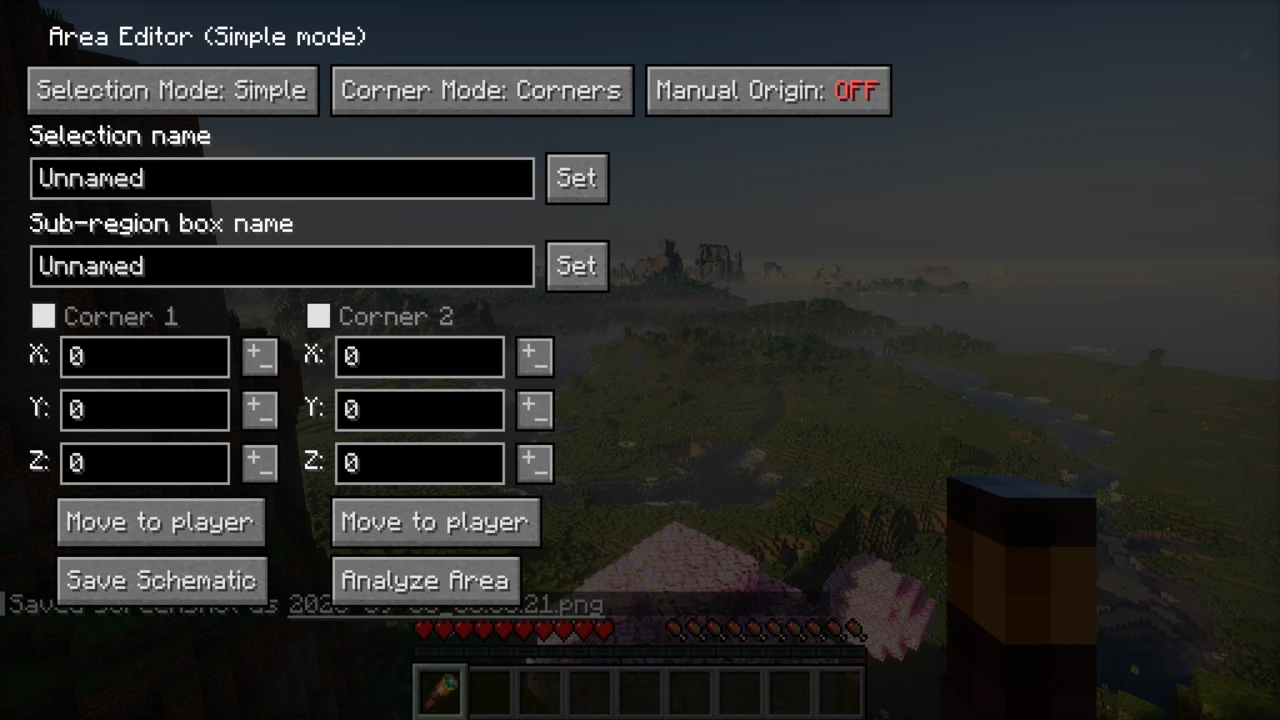
To save your own, hold the tool item (a stick by default), cycle to Area Selection with Ctrl and scroll, set the two corners of the box, then open the Area Editor with Numpad Multiply and save. Alt and scroll nudges a corner or the whole box without walking to it.
Easy Place is not a printer
Litematica has no printer, by design: the project states the feature is "not planned for Litematica itself" and is left to extension mods. Third-party projects called Litematica Printer do add unattended building, but they are separate mods with their own risks, not a Litematica feature.
What Litematica has is Easy Place, which is assisted placement rather than automation. With it enabled, right-clicking a hologram block selects the correct item and places it in the orientation the schematic specifies, which removes the guesswork from stairs, slabs, observers and repeaters. You still right-click once for every block, and it is off by default.
It also carries a warning from the project itself: "The Easy Place mode feature may get you banned on some servers!" The reason is mechanical: to place a block, Easy Place clicks the air block at the target position rather than the face of a neighbour, and anti-cheat systems watch for exactly that. Either the server rejects the placement and leaves you with a ghost block, or it reads the pattern as automation.
This is the one part of Litematica that servers have an opinion about. Nothing is installed server-side, and building by hand sends ordinary block placements, so the mod itself needs no permission. Easy Place is different. Litematica has placement protocol settings because server software varies, but no setting answers the policy question: a mod working is not the same as a server permitting it, so check the rules before switching it on.
MaLiLib, Fabric API and matching versions
Litematica does not run on its own. It requires MaLiLib, a library mod holding the shared configuration and interface code behind masa's client mods, and the pairing is stricter than most.
The two version numbers do not correspond. Minecraft 26.2 needs Litematica 0.28.5 with MaLiLib 0.29.4, not a matching 0.28.x. Minecraft 1.21.11 needs Litematica 0.26.13 with MaLiLib 0.27.18. Guides that tell you to match the mod versions send you to the wrong file. Match the Minecraft version in the filename instead: litematica-fabric-26.2-0.28.5.jar belongs with malilib-fabric-26.2-0.29.4.jar because both say 26.2. Both mods declare hard incompatibility ranges, so a mismatch stops the game starting rather than causing something subtle.
Fabric API is the other half of this, and the usual advice about it is wrong. Litematica's own manifest lists only Minecraft and MaLiLib, which is why you will read that Fabric API is not needed. But MaLiLib requires Fabric API modules, and MaLiLib is mandatory, so a working install is Fabric Loader, Fabric API, MaLiLib and Litematica. Both statements are true, but only one of them is useful.
Current versions and loaders
On modern Minecraft, official Litematica is Fabric only:
- Minecraft 26.2: Litematica 0.28.5, with MaLiLib 0.29.4
- Minecraft 26.1 to 26.1.2: Litematica 0.27.11, with MaLiLib 0.28.10
- Minecraft 1.21.11: Litematica 0.26.13, with MaLiLib 0.27.18
Separate builds cover the earlier 1.21, 1.20 and older lines back to the 1.14 era, and the only non-Fabric releases are legacy ones for 1.12.2 and 1.13.2. There is no official Forge or NeoForge build for any current version: Forgematica is an unofficial (Neo)Forge port maintained by other developers, and its Minecraft 26.2 build is still marked beta.
Litematica was written by masa and remains his project. Current releases are built by a maintainer from a fork, so the source link points elsewhere but the downloads are official. It is LGPL-3.0, Java Edition only, and has passed 23 million downloads on Modrinth.
When the hologram does not appear
- The schematic is loaded but not placed. Loading alone shows nothing, so create a placement.
- Rendering is toggled off.
M + R toggles all of Litematica's rendering and M + G just the ghost blocks. Both are easy to hit by accident and both look like the mod having failed.
- A layer mode is hiding it. If rendering is restricted to one layer and you have moved since, you may be looking at an empty slice.
- Shaders are on. On Minecraft 1.21.3 and later, schematic rendering does not work properly with shaders, including Iris. Turn them off while building.
- OptiFine. Render Regions and Fast Render both break schematic rendering and need disabling. The author recommends Sodium with Iris over OptiFine generally.
- Part of the build is in unloaded chunks. Litematica can only draw where the world exists on your client.
Litematica, WorldEdit and Schematica
These three get confused. WorldEdit runs on the server and edits the world directly: //paste makes a build appear instantly, which is what you want in creative or as an admin and no help in survival, where the materials still have to come from somewhere. Litematica places nothing: it shows you what to build so you can build it yourself, which is why technical players use it for farms and megabuilds. Schematica is the older Forge mod it effectively replaced on modern versions. Schematica had a printer, and Litematica deliberately does not. Want a structure to appear? WorldEdit. Want help building one by hand? Litematica.
You need four things, all built for the same Minecraft version: Fabric Loader, Fabric API, MaLiLib and Litematica. Forge and NeoForge are not supported by the official mod.
How to Download Litematica for Minecraft
Open the Litematica Downloads section on this page and pick the row for your Minecraft version. Click Download and you continue to the matching Litematica file on Modrinth. Then fetch MaLiLib for that same Minecraft version from its own Modrinth page, and Fabric API for that version too. Do not try to make the two mods' version numbers match each other: the Minecraft version in the filename is the part that has to match.
For Minecraft 26.2 that means litematica-fabric-26.2-0.28.5.jar alongside malilib-fabric-26.2-0.29.4.jar.
How to Install Litematica in Minecraft
- Install Fabric Loader for your Minecraft version and launch that profile once.
- Put all three JARs in the instance's
mods folder. The default launcher profile uses %appdata%\.minecraft\mods. Prism, MultiMC and the CurseForge app keep a separate folder per instance, and it has to be that instance's.
- Launch, join a world and press
M. The Litematica menu opening is the confirmation that it loaded.
Mod Menu is optional
Litematica ships Mod Menu integration but does not need it. Adding the Mod Menu JAR gives you a mod list on the main menu and a button through to Litematica's settings, which is handy if a hotkey has been reassigned and you cannot open the menu in-game.
Where schematics go
A schematics folder appears in the same game directory once Litematica has run once. Drop .litematic, .schem, .schematic or .nbt files in there and they show up under Load Schematics in the M menu.
If something is wrong
- Nothing happens when you press
M. If the mod loaded, you may be on a non-QWERTY layout: the key is , on AZERTY. If it did not, the game log will say why.
- The game will not start. Usually a MaLiLib version mismatch: the two refuse to run against an incompatible partner rather than failing quietly.
- An error mentions
fabric-api. Fabric API is not installed. MaLiLib needs it even though Litematica's own dependency list does not mention it.
- Litematica is missing entirely. Either MaLiLib is absent, or the JARs went to the wrong folder: with a third-party launcher,
.minecraft\mods is not the instance folder.
New to this? The mod installation guide covers loaders and instance folders in more detail, and our guide to mods that will not load goes further into dependency errors.