Distant Horizons

Distant Horizons is a client-side Minecraft mod that renders simplified Level-of-Detail terrain far beyond your normal render distance, replacing the fog wall with actual landscape at a fraction of the cost of loading real chunks. It builds that terrain from areas you have explored and caches it per world. Shader support runs through Iris 1.7+, but only for shaderpacks that implement it.

32M+ Downloads by Distant Horizons Team

About Distant Horizons

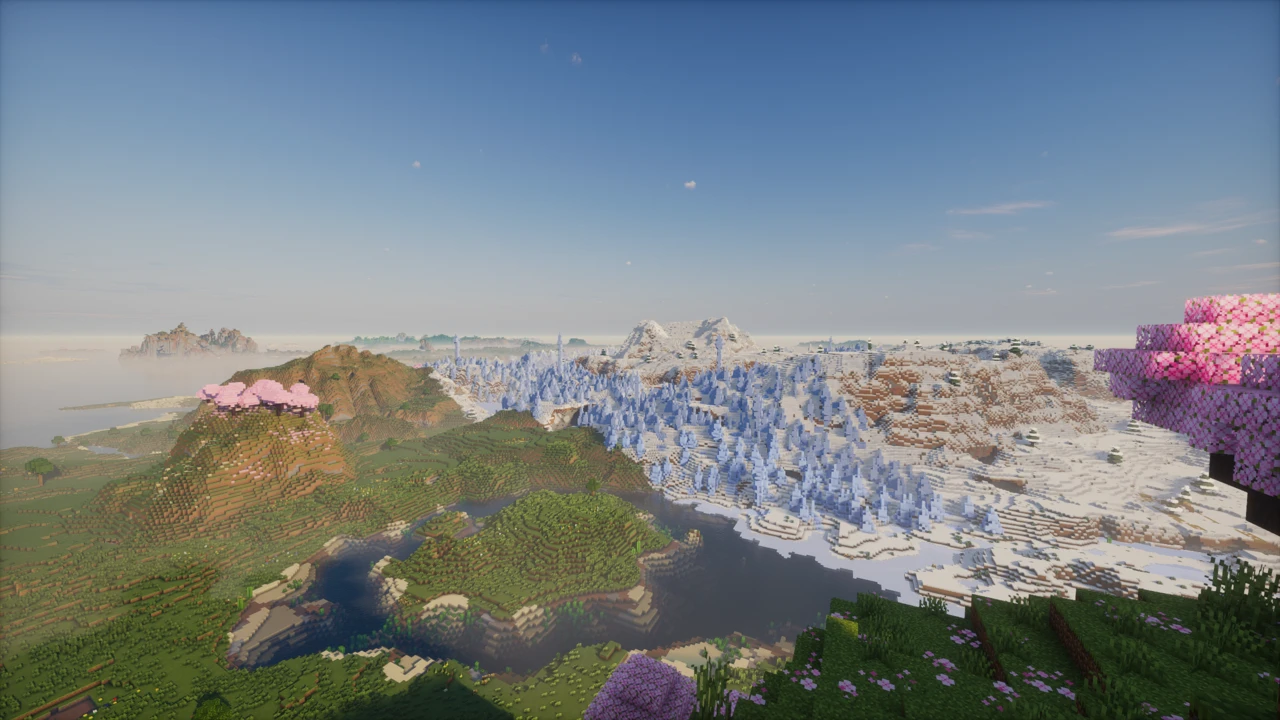
The Distant Horizons Mod solves a problem Minecraft has had since the beginning: the horizon is a wall of fog a few hundred blocks away, and pushing it back by raising render distance costs more than most machines can pay. Distant Horizons takes a different route. Rather than loading more chunks, it draws a cheap, simplified version of the land beyond your render distance, so you get a horizon with mountains and coastlines on it instead of grey.

That distinction is the whole mod, and it is the thing most guides get wrong. Setting the LOD distance to 512 does not load 512 chunks.

What you are actually looking at out there

Everything past your normal render distance is a Level-of-Detail mesh: a stripped-down model of the terrain that keeps its shape and roughly its colour, and throws away the rest. Elevation survives. Biome colouring survives, enough that a desert still reads as a desert and an ocean as an ocean. Individual blocks, entities, chests, item frames, most foliage detail and anything small do not.

This is why distant terrain looks softer and flatter than the ground under your feet. It is not a rendering fault or a setting you have got wrong. It is genuinely different geometry, and being cheap to draw is the entire point. The mod blends the two at the boundary using fog and depth so the handoff is not a hard line, though how well that reads depends heavily on your shader setup. Colours in the Nether are a known weak spot, with the top surfaces sometimes shaded incorrectly.

This is a design choice rather than the only approach. Bobby, the other well-known distance mod, caches real chunks and redraws them, keeping full block detail at a far higher storage cost. Distant Horizons trades that detail away deliberately, for reach and for shader integration.

It can only show you places you have already been

Distant Horizons does not generate world. It samples chunks your game has loaded, builds LOD data from them in the background, and files it away. The practical consequence catches almost everyone out: drop into a brand new world with the mod installed and the horizon is empty, because there is nothing to draw yet. Terrain appears as you travel and the mod catches up.

What it builds is written to a local SQLite database and kept per world, so the second visit to a region costs nothing. Depending on your version and configuration that data sits either in a DistantHorizons folder inside your Minecraft directory or alongside the world itself, and it grows with how much you have explored.

Deleting it is safe and is the correct fix for one specific problem. LOD data is a snapshot of the terrain as it was when sampled, so if you install a world generation mod, run a large world edit, or otherwise change what the ground looks like, the old data keeps showing the old shape. Clear the cache and let it rebuild.

Render distance, simulation distance and LOD distance

Three separate numbers, and conflating them is where most confusion starts. Render distance is vanilla Minecraft loading real chunks with every block in them. Simulation distance governs which of those chunks actually tick, so mobs move and crops grow. Distant Horizons touches neither. Its LOD distance only decides how far the simplified mesh is drawn.

In practice that means a low vanilla render distance paired with a high LOD distance is not a compromise, it is the intended configuration. Eight to twelve chunks of real terrain is plenty once the mod is filling in everything past it, and keeping that number down is what frees the budget to spend on distance.

On a multiplayer server the same logic holds from the other side. The server sends you what its own render distance allows, and no client setting changes that. Distant Horizons is drawing terrain you have already been sent, not asking for more.

Shaders: Iris 1.7 is necessary, not sufficient

Shader support is the part worth reading carefully, because "works with Iris" is not the same as "works with your shaderpack". Distant Horizons 2.1.0 and later needs Iris 1.7 or newer, and older Iris builds will not do it at all. That is the floor, not the finish line.

Iris exposes three dedicated programs a pack can implement, covering LOD terrain, LOD water and the LOD shadow pass, plus a flag it can test to know Distant Horizons is present. A pack that implements them shades distant terrain properly. One that does not leaves it flat and unlit, with an obvious seam where your real chunks end, or may not draw it at all.

Support is therefore per-pack and has to be checked per-pack. Complementary supports it but keeps it behind a compatibility toggle in its own settings, which trips people up. Photon, BSL and Sildur's Vibrant and Bliss have all added support. Anything else, check the pack's own changelog rather than assuming. OptiFine only partially works, on forward-rendered shaders, and is not the route the project recommends.

Where the cost actually lands

The mod is not free, and it helps to know which half of your machine pays. Building LOD data is CPU work, and it happens in the background while you explore new ground. That is where stutter comes from, and it settles once an area is done. Drawing the result is GPU work, and it is constant but far cheaper per unit of distance than real chunks would be.

Which means the two dials do different jobs. LOD render distance and LOD quality buy visual reach and detail, and they are charged to the GPU. CPU load controls how aggressively generation runs: turn it down if exploring makes the game hitch, accept slower fill-in. Distant generation can be switched off entirely, which is the right call when the data has already been built or is being supplied to you.

On servers, and what the plugin adds

Nothing needs to be installed on the server. Distant Horizons is a client mod that works on ordinary vanilla servers, generating its LOD data from whatever the server sends you as you play, which is why the horizon fills in as you travel rather than arriving complete.

There is an optional server-side component, distributed separately as a plugin rather than bundled with the mod. It builds LOD data server-side and pushes it to connecting players who have the mod, so a new arrival sees the landscape immediately instead of walking it into existence. Worth it on an established server, unnecessary on a small one.

Versions, loaders and the beta label

Release 3.2.0-b landed on 7 July 2026 and covers an unusually wide spread in one go: builds exist for every supported Minecraft version from 1.12.2 up to 26.2. Which loader you get depends entirely on the game version. From 1.20.6 onward a single JAR serves Fabric and NeoForge; on 1.20.4 and earlier the equivalent JAR serves Fabric and Forge; 1.12.2 is Forge only. There is no Forge build for 1.21 or newer, so a Forge instance on a current version is not an option.

On Fabric you also need Fabric API, which the mod's own manifest requires even though its Modrinth listing does not mention it. NeoForge and Forge builds need nothing beyond the loader. And every release the project ships, including this one, sits on the beta channel. The mod is stable enough to be used by millions, but the developers have not declared any build final, and it is honest to know that going in.

Picking the right file

Distant Horizons is Minecraft: Java Edition only, and builds are specific to one Minecraft version: there is no universal JAR. Work out your game version first, then your loader, because the two are linked:

  • Minecraft 1.21 and newer, including 26.x: Fabric or NeoForge. No Forge build exists.
  • 1.20.6: one JAR covering Fabric and NeoForge.
  • 1.20.4 and older: one JAR covering Fabric and Forge.
  • 1.12.2: Forge only.

With those two settled, open the Download section on this page and take the row matching your Minecraft version and loader; it links to the project's own Modrinth release. CurseForge and the project's GitLab carry the same builds. Nowhere else does: this mod is popular enough to attract reupload sites, and none of them are official.

Installing it

  1. Install your loader for the matching Minecraft version and run it once so the folders exist.
  2. On Fabric, add Fabric API as well. The mod requires it, whatever the Modrinth listing suggests. On NeoForge and Forge nothing extra is needed.
  3. Drop the JAR into mods. Keep it as a JAR; nothing needs extracting. Launchers other than the official one generally give each instance its own mods folder, so check you are putting it in the right place.
  4. Start the game and load a world. A new options entry appears under video settings once the mod is running.

Fresh install guidance, in order: drop your vanilla render distance to roughly 8–12 chunks, then raise the Distant Horizons LOD distance well past it. That pairing is the point of the mod, and running a high vanilla render distance alongside it just spends the same budget twice.

Then go for a walk. The horizon starts empty and fills in behind you, because there is nothing to draw until the mod has sampled some terrain. Give it a few minutes before deciding anything is broken.

If something looks wrong

  • No distant terrain at all. Usually you simply have not explored yet. Check that distant generation is enabled, then travel.
  • Distant land is flat, grey and unlit while shaders are on. Your shaderpack does not implement Distant Horizons support, or has it switched off in its own settings. Complementary in particular keeps that toggle in its compatibility options.
  • Shaders behaving strangely at the boundary. Check that you are on Iris 1.7 or newer; older builds cannot render LOD terrain regardless of the pack.
  • The distance shows terrain that no longer exists. Cached LOD data has gone stale after a world change. Deleting the cache is safe and forces a rebuild.

If loaders themselves are new to you, work through the guide to installing Minecraft mods first and come back to this page afterwards.

Download Distant Horizons

Release status VersionMinecraft version Platform / LoaderReleased Download
3.2.0-b-26.2Latest versionBeta 26.2 Fabric, NeoForge Download
3.2.0-b-26.1.2Beta 26.1.2–26.1 Fabric, NeoForge Download
3.2.0-b-1.21.11Beta 1.21.11 Fabric, NeoForge Download
3.2.0-b-1.21.10Beta 1.21.10 Fabric, NeoForge Download
3.2.0-b-1.21.9Beta 1.21.9 Fabric, NeoForge Download
3.2.0-b-1.21.8Beta 1.21.8 Fabric, NeoForge Download
2.3.3-b-1.21.7Beta 1.21.7 Fabric, NeoForge Download
3.2.0-b-1.21.6Beta 1.21.6 Fabric, NeoForge Download
3.2.0-b-1.21.5Beta 1.21.5 Fabric, NeoForge Download
3.2.0-b-1.21.4Beta 1.21.4 Fabric, NeoForge Download
3.2.0-b-1.21.3Beta 1.21.3 Fabric, NeoForge Download
3.2.0-b-1.21.1Beta 1.21.1 Fabric, NeoForge Download
3.2.0-b-1.20.6Beta 1.20.6 Fabric, NeoForge Download
3.2.0-b-1.20.4Beta 1.20.4 Fabric, Forge Download
3.2.0-b-1.20.2Beta 1.20.2 Fabric, Forge Download
3.2.0-b-1.20.1Beta 1.20.1 Fabric, Forge Download
2.3.0-b-1.20.1Beta 1.20 Fabric, Forge Download
3.2.0-b-1.19.4Beta 1.19.4 Fabric, Forge Download
3.2.0-b-1.19.2Beta 1.19.2 Fabric, Forge Download
3.2.0-b-1.18.2Beta 1.18.2 Fabric, Forge Download
3.2.0-b-1.17.1Beta 1.17.1 Fabric, Forge Download
3.2.0-b-1.16.5Beta 1.16.5 Fabric, Forge Download
3.2.0-b-1.12.2Beta 1.12.2 Forge Download

FAQ

What does Distant Horizons actually do?

It draws simplified terrain past your normal render distance so the horizon shows real landscape instead of fog. That terrain is a low-detail mesh built from chunks you have already visited, not extra chunks being loaded.

Does Distant Horizons need to be installed on the server?

No. It works client-side on ordinary vanilla servers. A separate optional plugin exists that pre-builds LOD data server-side and sends it to players who have the mod, which saves them generating it themselves, but nothing about the mod requires it.

Does Distant Horizons work with any Iris shaderpack?

No, and this is the most common misunderstanding. Iris 1.7 or newer is required, but each shaderpack also has to implement Distant Horizons rendering itself. Packs that have not will leave distant terrain unshaded. Check the pack's changelog before assuming.

Why is there no distant terrain in my world?

Almost always because the mod has not sampled that ground yet. It builds its data from chunks you load, so a new world starts with an empty horizon that fills in as you explore. Confirm distant generation is switched on, then travel.

Does Distant Horizons require Sodium?

No. It runs without it, though pairing the two is common because rendering performance helps. Note that Sodium does not exist on Forge, so a Forge setup on an older Minecraft version cannot combine them anyway.

Does Distant Horizons work with Forge?

Only on older Minecraft versions. Builds for 1.20.4 and earlier cover Fabric and Forge together, and 1.12.2 is Forge only. From 1.21 onward there is no Forge build at all, and NeoForge is the equivalent.

Can I use Distant Horizons and Voxy at the same time?

They are alternatives rather than companions, since both replace how distant terrain is drawn. Pick whichever suits you and run it on its own rather than stacking two competing systems.

Is Distant Horizons free and open source?

Yes. It is released under LGPL-3.0-only with full source on GitLab, and downloads are free from Modrinth and CurseForge. Every current build is published on the beta channel; the project has not declared a stable release.

Related
Mod · NeoForge / Fabric

Sodium

Sodium is a client-side optimization mod for Minecraft that replaces the game's rendering engine with a faster, modern one. It significantly improves frame rates and reduces micro-stutter without changing how the game looks or plays, and it stays compatible with a wide range of other mods.

Mod · Fabric

Litematica

Litematica renders a saved build as a translucent hologram you copy block by block, with a material list, layer-by-layer rendering and a verifier that reports every wrong or missing block. It is client-side, needs MaLiLib, and has no built-in printer.

Mod · NeoForge / Fabric

VeinMiner

VeinMiner by MiraculixxT breaks a whole connected vein when you mine one block of it. It runs on the server, so every player benefits without installing anything, and its block groups, tool restrictions and limits are configured live through chat commands rather than a config file.