
How to fix OptiFine not working depends on where your setup stops, because that phrase covers several unrelated failures. The installer refuses to open. It finishes and leaves nothing in the launcher. Minecraft closes on launch, or runs fine while the Shaders button never appears.
Reinstalling is a poor opening move. Work out how far the chain gets before it breaks and most candidates rule themselves out. Two facts do most of that work: your exact Minecraft version, and whether OptiFine went in via its own installer or a Forge mods folder.
Check that OptiFine exists for your version yet
Every OptiFine release targets one Minecraft version, and the trap on optifine.net is taking the newest build on the page rather than the newest under the heading matching your game. A build made for 1.21.8 will not run 1.21.11. Our OptiFine download list is the quickest way to see which build covers your version before it sends you through to the site for the file.
Two situations catch people out. Where your version has no heading at all, OptiFine has not been released for it yet, and builds often arrive weeks or months after a Minecraft release. An entry carrying a pre suffix is a preview, worth remembering when a feature misbehaves.
Mirror sites repackage OptiFine, often with stale builds or bundled extras, and the project's own documentation tells people to avoid them. An .exe did not come from OptiFine.
When the installer will not open
The download is a .jar, a Java program rather than a normal application. If double-clicking opens WinRAR or does nothing, Java is missing or not registered as the owner of that file type. OptiFine's documentation points Windows users at Jarfix, which repairs the association.
Running java -jar from a terminal prints a reason instead of failing quietly. Could not find the main class points at a Java installation that is present but broken. If the installer cannot find your Minecraft version, those game files were never created: run that version once in the launcher, close it, and install again.
The installer needs Java on your system, and OptiFine's documentation asks for a JRE above version 8. Minecraft runs on a runtime the official launcher supplies per version, so installing newer Java to open the installer changes nothing about how the game runs. Our Forge guide covers what the game expects.
Installed, but missing from the launcher
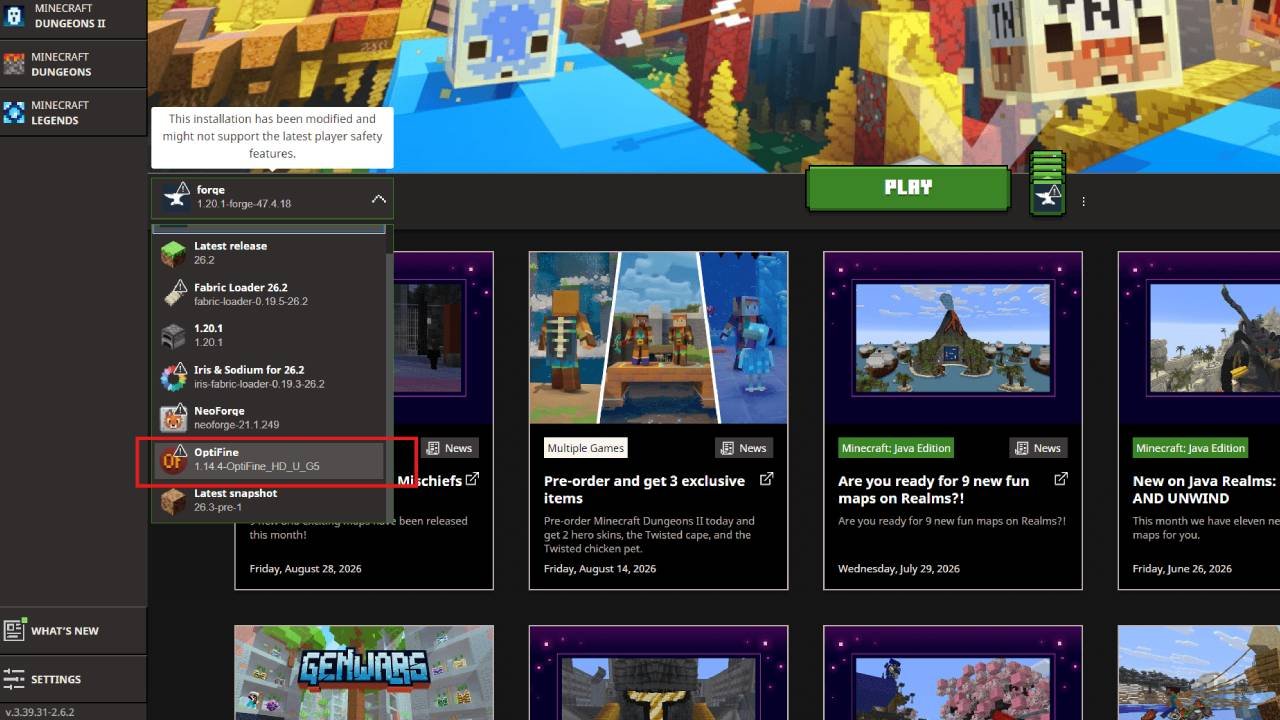
OptiFine does not appear as its own tile. It installs as a version entry, something like release 1.21.11-OptiFine_HD_U_J9, which you pick from an installation's version dropdown, so create a fresh installation and scroll that dropdown before deciding the install failed. The launcher also hides modded entries behind a filter in the Installations tab. And the installer writes into whichever game directory it detected, so a profile pointed at a custom directory will never see a version created beside the default .minecraft.
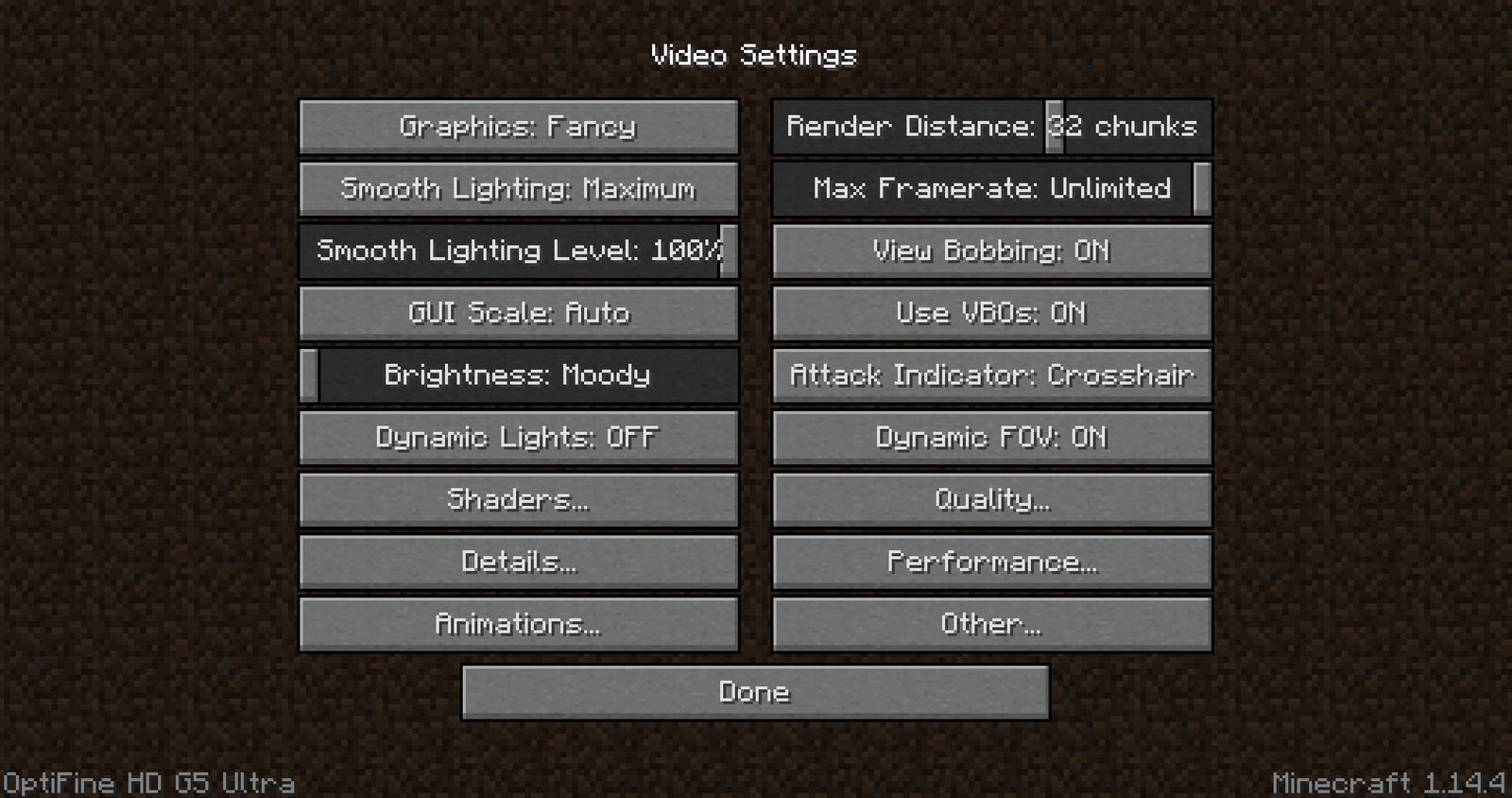
Once it launches, confirm OptiFine is really loaded rather than the vanilla profile. In Options, then Video Settings, the controls OptiFine adds fill several pages, including Quality, Details and a Shaders button, and holding C should zoom. If none of that exists, nothing below will help.
Running OptiFine alongside Forge
For ordinary Minecraft, run the installer and let it create a version entry. For Forge, do not run the installer at all: install Forge for your version, launch it once so its folders exist, then drop the OptiFine .jar into that instance's mods folder.
Support is documented per build: the Forge column on the downloads page names the Forge version each OptiFine build was built against, and N/A means no Forge support at all.
Large modpacks are another matter. OptiFine reaches deep into rendering, and community experience with big Forge packs is mixed enough that no compatibility list would be worth trusting. Many modded players run Embeddium with Oculus instead. If OptiFine behaves alone and fails inside a pack, treat it as a conflict and narrow it down like any mod that refuses to load.
Shaders that will not load
There is no Shaders button
Either OptiFine is not loaded, or the build lacks shader support. Preview builds have shipped with shaders switched off while the renderer caught up with a new Minecraft version, so check the changelog and try the newest stable build for your version.
The menu opens but your pack is not listed
Use Open Shader Pack Folder from inside that menu rather than guessing the path, and leave the pack zipped. An extracted folder generally will not be detected.
The pack loads and the game falls over
Black screens, mangled geometry and crashes as shaders turn on usually implicate the graphics driver or the pack, not OptiFine. Update drivers, try a lighter pack, and cut render distance.
Placement is covered in installing shaders, the harder cases in shaders not working. Iris with Sodium replaces OptiFine rather than joining it, and the two do not belong in one profile.
Resource pack features that need OptiFine
A pack can install correctly and still look wrong. Most packs are ordinary resource packs with OptiFine extensions on top: connected textures, custom item textures, custom entity models and emissive textures are OptiFine features, not vanilla ones. If only those effects are missing, the pack is fine and the extension layer is not.
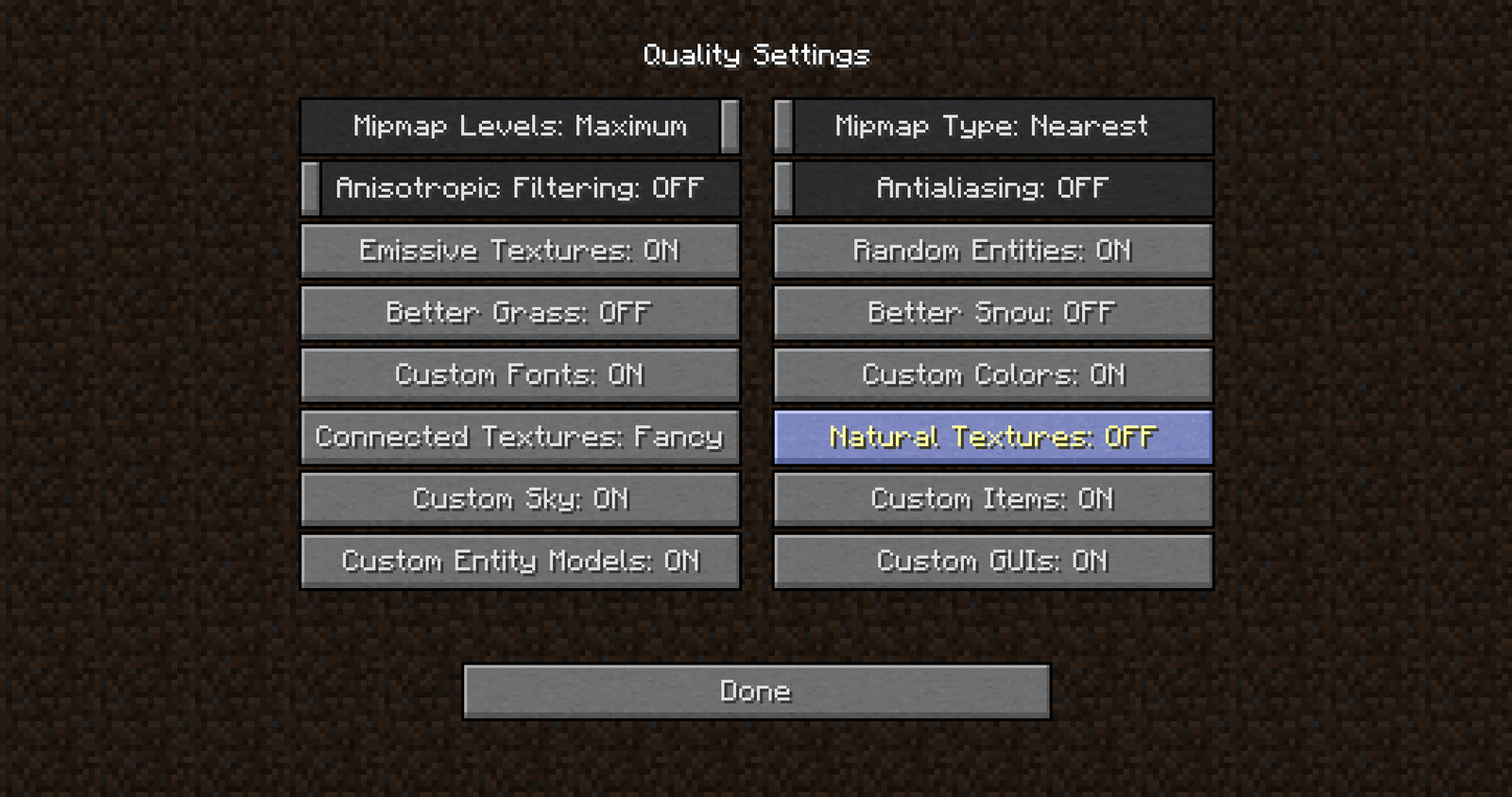
Check Video Settings under Quality, where Connected Textures, Custom Items, Custom Entity Models and Natural Textures each have their own toggle. With those on and the effect still absent, the pack's .properties files are the next suspect. Packs that fail to load at all belong in texture packs not working.
Add things back one at a time
When several changes landed at once, nothing the current state tells you is trustworthy. Build back up in a new installation with its own game directory, testing at each stage. The step that breaks names the culprit, and nothing existing is touched.
Vanilla first
Launch your target version with no OptiFine. If that fails, OptiFine was never the problem.
OptiFine on its own
Install the matching build and confirm the extra video settings appear.
Forge, then mods
Only if you need them, in small batches rather than the whole folder.
Shaders and packs last
They sit on top of everything else, the worst place to start.
Crash reports go to crash-reports in the game directory, the full run to logs/latest.log. You are not reading the stack trace, only scanning for which component gets named: OptiFine, a shader, OpenGL, a mod. The final line is rarely the cause.
Advice that sends people in circles
- Install the newest OptiFine. The newest build overall is usually for another Minecraft version, and may be a preview.
- Install the latest Java. That affects the installer, not the runtime the launcher hands the game.
- Put OptiFine in the mods folder. Right for Forge, wrong for every other setup.
- OptiFine will fix your frame rate. It adds settings that can help, though shaders and heavy packs cost more than they save.
- Delete .minecraft and start fresh. That takes your worlds, screenshots and settings, and repairs almost nothing.
FAQ
Why is OptiFine not showing up in the Minecraft launcher?
It is a version entry rather than a separate installation, so look in an installation's version dropdown. Enable the modded filter, and check the installer used your profile's game directory.
Why will the OptiFine installer not open?
Java is missing, or .jar files are not associated with it. Run it with java -jar to see the real error. OptiFine's documentation recommends Jarfix on Windows.
What Java version does OptiFine need?
The installer needs system Java above version 8. The game is separate: the official launcher supplies a runtime matched to your Minecraft version.
Does OptiFine work with Forge?
For specific builds. The Forge column on the downloads page names the Forge version each build supports, and N/A means it does not. Install Forge, run it once, then add the OptiFine jar to its mods folder.
My resource pack loads but connected textures do not work. Why?
Connected textures are an OptiFine feature, not a vanilla one. Confirm OptiFine is loaded, then check Video Settings under Quality, where the option can be off independently of the pack.
Should I reinstall Minecraft if OptiFine is not working?
Almost never. Version mismatches, launcher profiles and mod conflicts account for most cases, and a clean test installation isolates those safely.