About Mizuno 16 Craft
Mizuno 16 Craft doesn't try to look like Minecraft. That's the point of it.
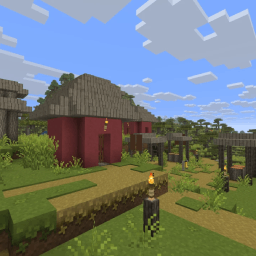
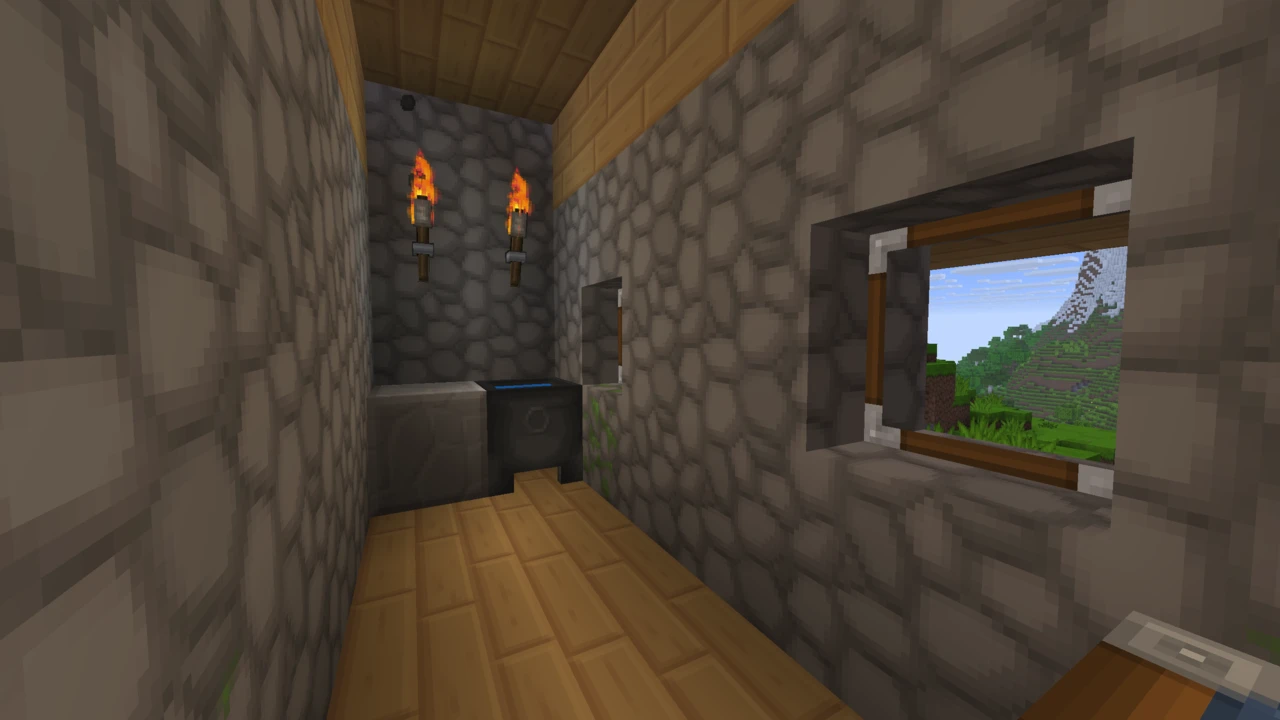
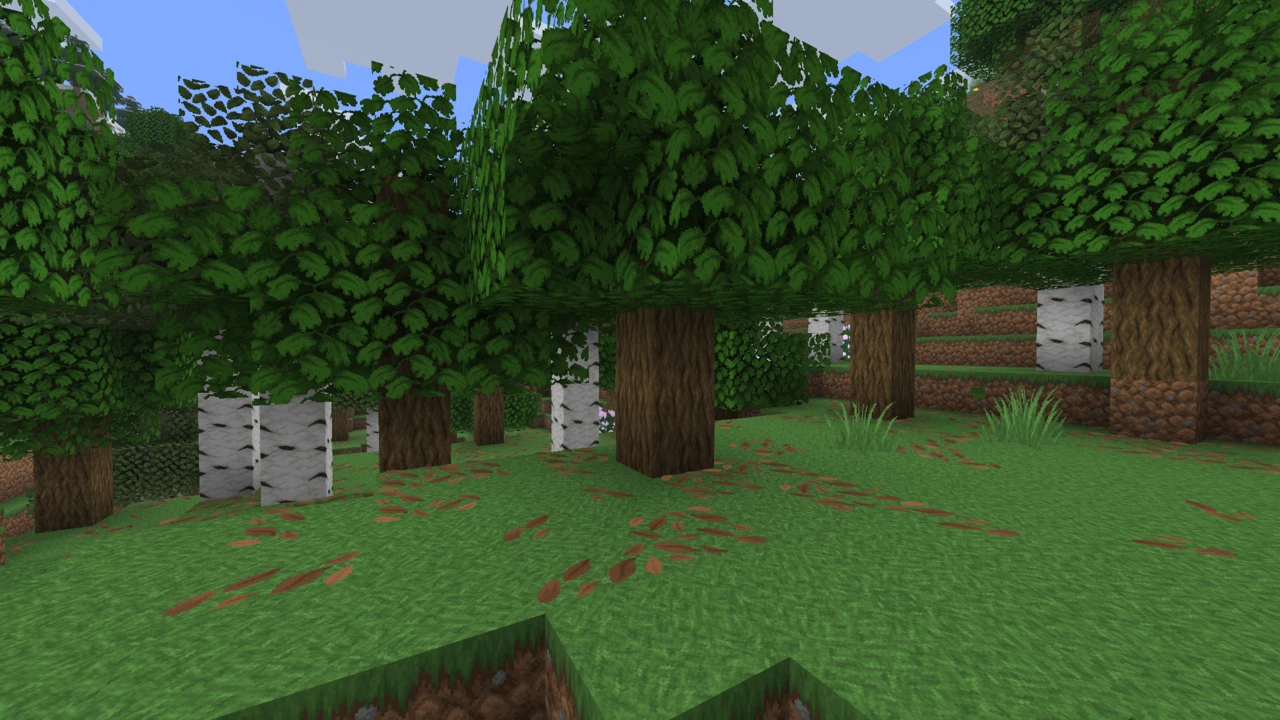
Where most well-known texture packs work hard to preserve the vanilla art style, this one replaces it with something else entirely: soft, hand-drawn, warm-toned textures with a storybook quality. Cobblestone reads as weathered stone rather than grey noise. Wood has visible grain and warmth. Flowers and plants look illustrated rather than pixelated. The overall effect is cosy, and it's why the pack has become a fixture in cottagecore and medieval-style building communities.
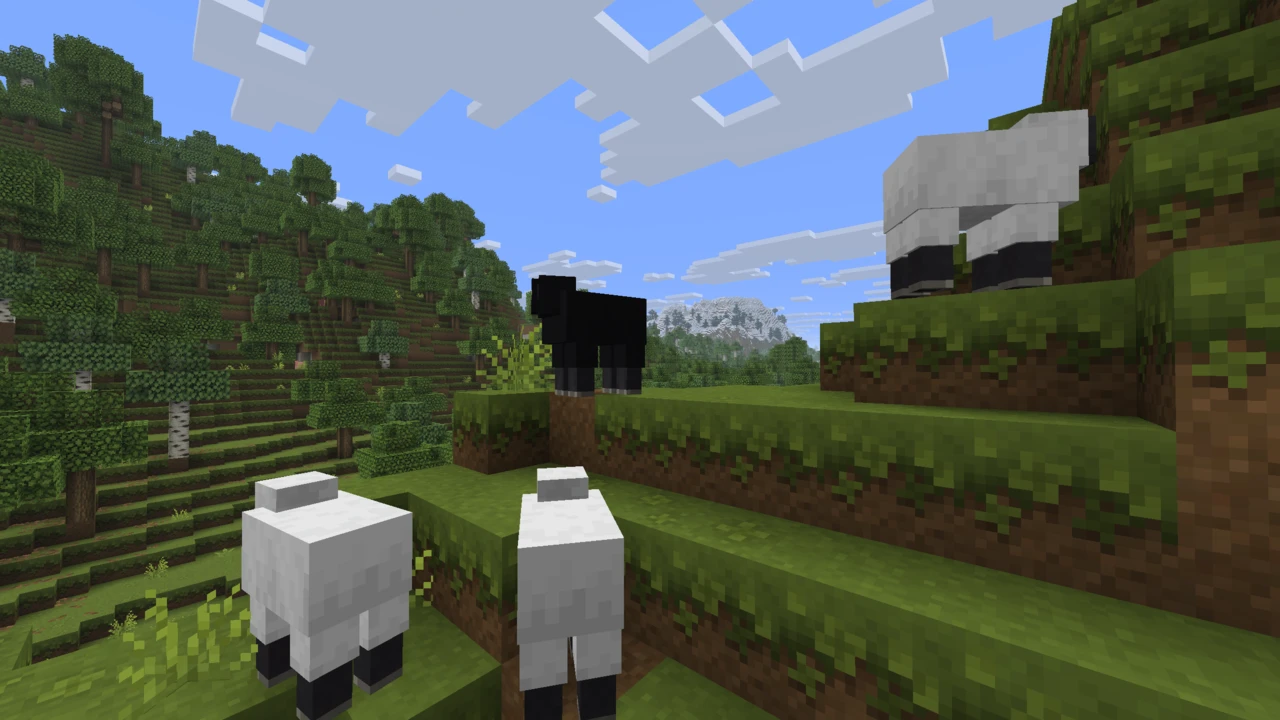
It's made by a Japanese creator known as Mizuno, and the influence shows in the artwork: the mob designs in particular have a distinctly softer, rounder character than vanilla's.
What the "16" means
The name refers to resolution: 16x, the same as vanilla Minecraft. Despite how detailed the pack looks, it isn't a high-resolution pack: every texture is drawn within the same 16×16 pixel grid Minecraft uses by default.
That's genuinely difficult to pull off. Low-resolution packs that attempt detailed artwork usually end up looking noisy or muddy, because there simply aren't enough pixels to carry the detail. Mizuno 16 Craft avoids that by keeping textures clean and relying on colour and shape rather than fine detail. The result reads as detailed without being busy.
It also means the pack carries no more texture overhead than vanilla, a practical benefit if you're on modest hardware.
What it actually looks like
The pack's strengths cluster around building rather than survival gameplay:
- Building blocks: stone, brick, plaster and wood variants are the pack's showcase, designed to sit together in constructed builds rather than just look right in isolation
- Interior decoration: an unusual amount of care goes into blocks used indoors, which is a big part of why builders gravitate to it
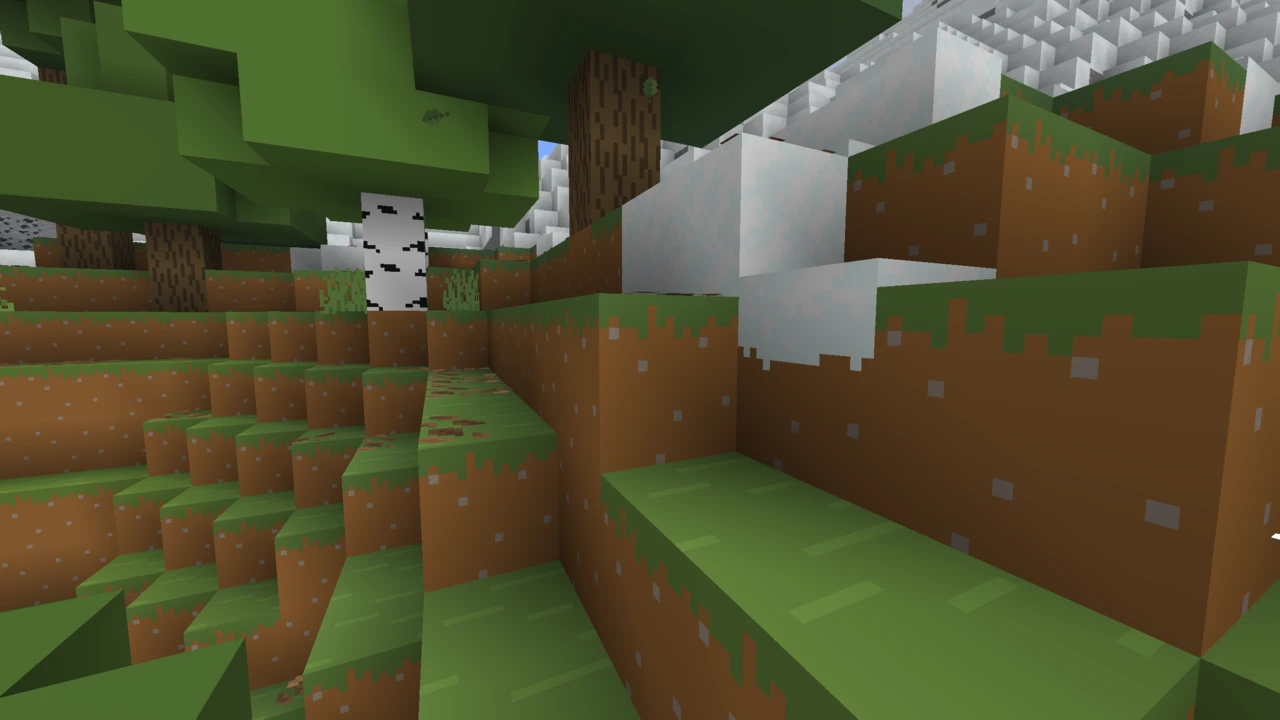
- Plants and terrain: softer, more illustrated foliage and ground textures
- Mobs: redrawn with a rounder, gentler character than vanilla's
- Items, armour and GUI: the interface and inventory art are reworked to match, so the style holds together rather than stopping at the world
People generally describe the aesthetic as cottagecore, cosy, or a blend of medieval and cartoon. It suits timber-framed houses, village builds and rustic interiors far more naturally than it suits, say, modern or industrial builds.
The important thing to know before you install it
Official Java Edition updates for Mizuno 16 Craft appear to have stopped. The most recent official releases target the Minecraft 1.20 series, and no official builds for 1.21 or newer have appeared.
This is widely acknowledged in the community. The creators of the two main add-ons both cite it directly as their reason for building them: one states plainly that Mizuno no longer updates the Java version, the other that official updates for newer Java content seem to have stopped.
What that means practically: if you play on 1.20.x, you can install the official pack and you're done. If you play on 1.21 or newer, blocks added since then (Pale Garden, Creaking Heart, resin blocks and so on) will fall back to vanilla textures, and some newer mob models can render incorrectly. There's a community solution for that, covered below.
Also worth flagging: the creator's own download page returned an error when we checked it. The blog it sits on is still up, but the distribution page itself wasn't loading, so it's worth trying the creator's site directly and checking their Planet Minecraft page as a fallback.
Using Mizuno 16 Craft on newer Minecraft versions
The community route is well-established and it's what most people on modern versions actually run.
Modern Mizuno's, made by coolbot100s, is an add-on that fills the gaps: it adds textures for blocks introduced after the official pack stopped updating, including Pale Garden and resin blocks, and fixes mob models that break on newer versions. It isn't made by Mizuno and isn't official, but it's actively maintained, with releases continuing into 2026.
It works as a layer rather than a replacement. You install the original pack, then place Modern Mizuno's above it in your resource pack list so its textures take priority where they exist and the original shows through everywhere else.
A second community pack, Unofficial Mizuno's by ShorkBee, takes a similar approach for 1.21+. Both exist because the original pack is well-liked enough that people were unwilling to give it up.
Add-ons and extras
Mizuno 16 Craft has an unusually active add-on ecosystem, and it's worth understanding which parts come from the creator and which don't.
From the creator
Mizuno has published a CIT pack alongside the main texture pack. It uses OptiFine's Custom Item Textures feature to add a range of decorative items: you rename an item on an anvil and it takes on a different appearance, letting you decorate with objects that don't exist as separate blocks in vanilla. For a pack aimed at builders, it's a natural fit.
The creator has also provided support for a handful of mods, including AppleSkin, Biomes O' Plenty and JourneyMap, so those mods' textures match rather than clashing.
From the community
Several well-used add-ons exist that Mizuno didn't make:
- Modern Mizuno's: newer block support for 1.21+
- Unofficial Mizuno's: an alternative approach to the same problem
- Mizuno Connected Texture: adds connected textures, which the base pack doesn't include
- Mod compatibility packs: retextures for specific mods like Productive Bees, plus assorted tweaks such as glass-bottomed boats
These are community projects. They're generally well-made and widely used, but they aren't maintained by Mizuno and their quality and update schedules vary independently.
Do you need OptiFine?
Not for the base pack. Mizuno 16 Craft installs and runs in vanilla Minecraft like any resource pack.
Two specific things do need extra software:
- The CIT decorative items require OptiFine, since Custom Item Textures is an OptiFine feature
- Connected textures aren't in the base pack at all. The community connected-textures add-on needs either OptiFine or Continuity to work
If you just want the pack's look, you don't need any of this.
Java and Bedrock
Mizuno 16 Craft is a Java Edition pack.
There is a separate Bedrock product by the same creator, listed on the Minecraft Marketplace as Mizuno Craft (note the different name). It's a paid Marketplace item rather than a free download, and the creator lists it as a distinct project from Mizuno's 16 Craft rather than a straight port. If you're on Bedrock, that's the route, but treat it as a related pack rather than the same one.
How it compares to vanilla-faithful packs
Worth being clear about what kind of pack this is, because it's often listed alongside packs doing something quite different.
Stay True and Faithful are both built around preserving Minecraft's existing art style: one remasters vanilla textures at the same resolution, the other raises resolution while keeping the look. Load either and the game still looks like Minecraft.
Mizuno 16 Craft doesn't do that. It's a genuine restyle: same resolution, different artistic language. If you want Minecraft to look better, the vanilla-faithful packs are the answer. If you want Minecraft to look like a different, cosier game, this is why people install it.
Performance
At 16x, the pack's textures carry the same resolution overhead as vanilla, so there's nothing inherent about it that should cost you frames. No official performance claims exist either way, and we're not going to invent numbers.
Two caveats worth knowing. Running the original pack plus a community add-on means Minecraft is loading two resource packs rather than one, though the practical impact of that is small. And OptiFine features like CIT and connected textures do a little extra work when enabled: modest, but not free.
Common problems
- Newer blocks show vanilla textures. Expected on 1.21+, since the official pack stopped at the 1.20 series. Add Modern Mizuno's above the original pack in your list.
- Mobs look broken or headless. Also a newer-version issue: mob model changes since the official pack's last update. The same add-on addresses it.
- Textures don't appear at all with mods installed. Usually resource pack load order. Mizuno needs to sit above mod-supplied packs.
- Decorative CIT items don't work. They need OptiFine, and you need the CIT add-on rather than just the base pack.
- No connected textures. The base pack doesn't include them. That's a separate community add-on requiring OptiFine or Continuity.
- The official download link doesn't load. The creator's distribution page returned an error when we checked. Try the creator's blog and Planet Minecraft page.
Where to download Mizuno 16 Craft
The pack has always been distributed from the creator's own website rather than through CurseForge or Modrinth, which is unusual and means there's no single mod-platform listing to point at. The creator's Planet Minecraft page links to the official site.
Because it's distributed this way and because official updates have slowed, a lot of third-party sites host their own copies. Those aren't authorised, and several carry old or repackaged builds. The community add-ons are a different matter: those are published by their own creators on CurseForge under their own names, which is the appropriate place to get them.
How to Download Mizuno 16 Craft for Minecraft
Mizuno 16 Craft is distributed from the creator's own website rather than CurseForge or Modrinth. The creator's Planet Minecraft page links through to it, which is the most reliable way to find the current location. The Download section on this page carries the community Modern Mizuno's add-on rather than the base pack, because that add-on is the part with a stable listing. It contains none of Mizuno's own textures and does not work without the original.
What you download depends on your Minecraft version:
- Playing 1.20.x? Download the official pack for your version and you're finished.
- Playing 1.21 or newer? Download the official 1.20 pack and the community Modern Mizuno's add-on, which is in the Download section on this page. You need both.
Official builds exist for a long list of older versions too (1.19, 1.18, 1.17, 1.16 and further back), so if you're playing something older, match the build to your version.
Optional extras, if you want them:
- The CIT pack from the creator, for decorative renameable items. Requires OptiFine.
- Mizuno Connected Texture, a community add-on. Requires OptiFine or Continuity.
Keep every file zipped. Resource packs go into the folder as .zip files.
How to Install Mizuno 16 Craft in Minecraft
Installing the pack
- Launch Minecraft and go to Options → Resource Packs.
- Click Open Pack Folder to open your
resourcepacks directory.
- Copy the Mizuno 16 Craft
.zip into that folder without extracting it.
- Back in Minecraft, move it from the available column to the selected column.
- Click Done.
If Minecraft warns that the pack was made for a different version, you can continue past it.
Adding the Modern Mizuno's add-on for 1.21+
Order matters here, and getting it backwards is the most common mistake.
- Install the original Mizuno 16 Craft pack first, following the steps above.
- Put the Modern Mizuno's
.zip into the same resourcepacks folder.
- Enable it, then make sure it sits above the original pack in your active list.
Both packs stay enabled. Minecraft reads from the top down, so Modern Mizuno's supplies textures for newer blocks while the original handles everything else.
If you want the decorative CIT items
- Install OptiFine for your Minecraft version.
- Add the CIT pack to your
resourcepacks folder and enable it alongside the main pack.
- In-game, rename the relevant item on an anvil to the name the pack expects. The item's appearance changes to the decorative variant.
Without OptiFine this add-on won't do anything, since Custom Item Textures is an OptiFine-specific feature.
Using it with mods
If you're running mods and Mizuno's textures aren't showing, check your resource pack order: Mizuno needs to be above any packs that mods supply. The creator has provided matching textures for AppleSkin, Biomes O' Plenty and JourneyMap, and community packs exist covering some other mods.
If something goes wrong
- Pack missing from the list. Check the
.zip wasn't extracted and that it's in resourcepacks.
- Newer blocks look vanilla. You need Modern Mizuno's, placed above the original pack.
- Add-on appears to do nothing. It's probably below the original in the list. Move it up.
- Broken mob models. Newer-version incompatibility, which the add-on addresses.
For anything else, our guide to texture packs that are not working covers the wider causes.